![cropped-logo-ingenius.png]](https://6solutions-7586191.hs-sites.com/hs-fs/hubfs/cropped-logo-ingenius.png?height=40&name=cropped-logo-ingenius.png)
To reset a forgotten password email support@ingenius-data.com and ask to have your password reset.
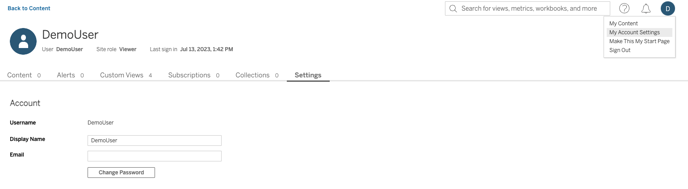
Once you're able to login and would like to change your temporary password:
- Navigate to the user icon in the upper right corner of the screen
- Select My Account Settings
- Click on Change Password
- Enter your current password
- Enter New Password
- Confirm your new password
- Save Changes